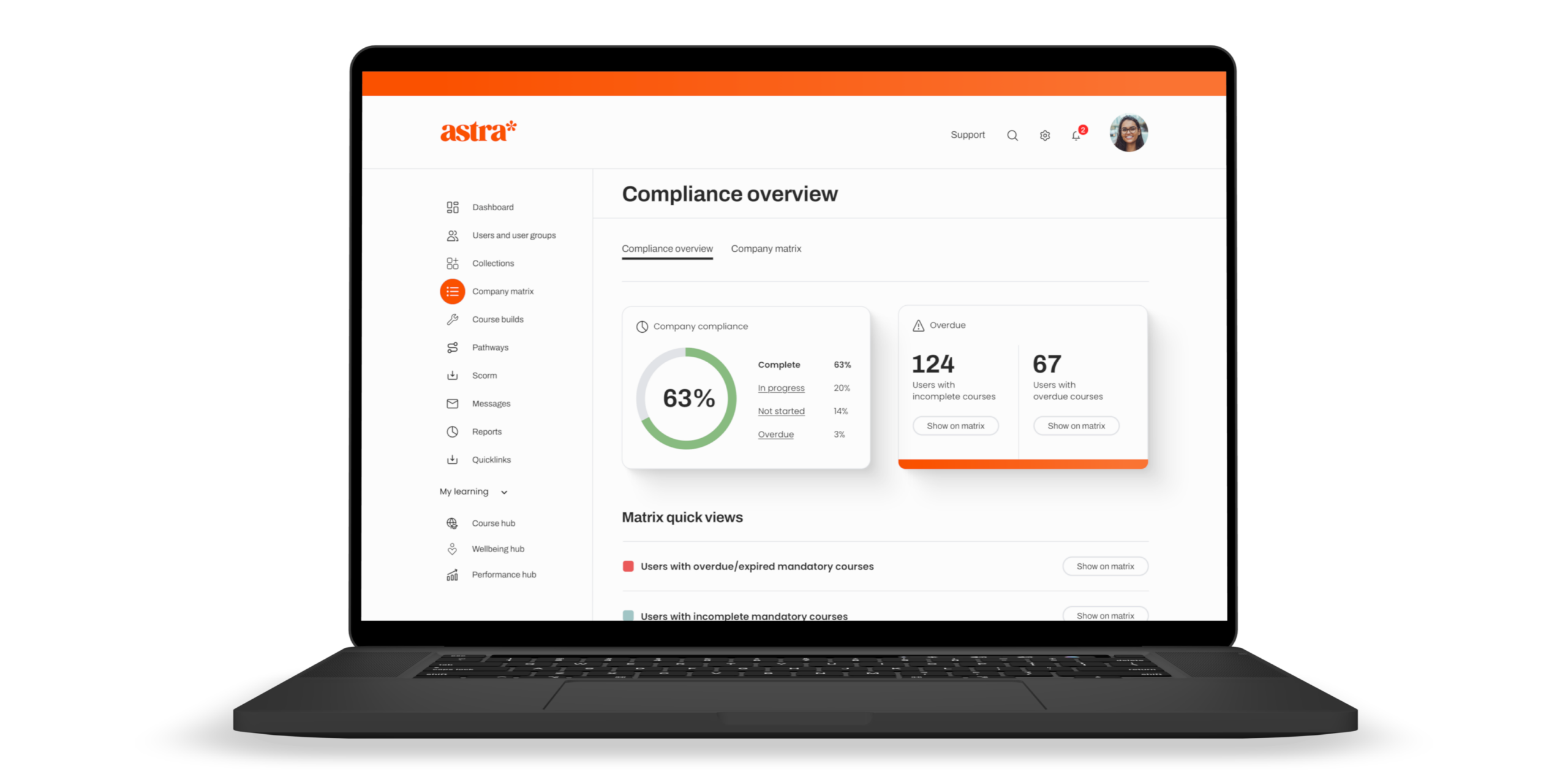
The right employee training software for a UK SME needs real-time completion dashboards, a compliance matrix that shows status by person or department and audit-ready, exportable reports. If your learning management system can’t produce an evidence-ready compliance report in under a minute, it’s not doing its job.
If you’re an HR or L&D lead comparing employee training platforms, reporting is usually the feature that gets the least attention in a sales demo and causes the most frustration six months later. This guide walks through what good LMS reporting actually looks like, the questions to ask during HR software selection, and how to tell basic reporting from advanced reporting before you sign a contract.
Looking for one Learning Management System that allows you to standardise, track and scale, you can start a free trial or request a quote from the Staff Skills academy+ team.
What is LMS reporting and why does it matter for UK SMEs
LMS reporting is the part of your employee training software that turns course completions into evidence: who’s done what, who’s overdue, and whether your organisation is meeting its compliance obligations right now, not at the end of the quarter.
For UK SMEs specifically, this matters more than the course library. Many training platforms cover common topics such as GDPR, health and safety, and equality and diversity. What separates them is whether you can prove, in the middle of an audit or an insurance renewal, that your workforce is trained and up to date. A learning management system without strong reporting leaves you with a course catalogue and no evidence trail.
What reporting features should you look for in employee training software
When you’re weighing up employee training platforms, look past the course count and check these five things.
Real-time completion dashboards
You should be able to see completion rates, overdue training and engagement levels the moment you log in, not after exporting a spreadsheet and building a pivot table. A dashboard that updates in real time saves hours of admin every month and means you’re never presenting stale numbers to leadership.
A compliance matrix
A compliance matrix shows training status by business, department or individual employee, in one view. This is the single most useful reporting feature for HR teams juggling mandatory training across multiple sites or teams, because it turns “is everyone compliant” from a research project into a glance.
Audit-ready exportable reports
Whether it’s a CQC inspection, an ISO audit or a client due diligence request, you need to export training records in a format you can hand over immediately. Look for customisable reports rather than one fixed template. Every audit asks slightly different questions, and a report you can adapt saves you rebuilding it from scratch each time.
Role-based and location-based reporting access
Larger SMEs and multi-site organisations need managers to see their own team’s data without wading through the whole organisation’s records, and without HR having to build separate spreadsheets for each department. Role- and location-based permissions solve this at source.
Engagement and heatmap data
Completion rates tell you whether training happened. Engagement data, such as heatmaps showing where learners drop off within a course, tells you whether it actually worked. This is the difference between reporting for compliance and reporting for genuine skills development.
How does LMS reporting support compliance visibility
Compliance visibility means knowing your organisation’s training status at any given moment, not just at the point someone asks for a report. Good LMS reporting supports this in three ways.
First, it removes the lag between something happening and someone knowing about it. Automated reminders paired with real-time dashboards mean overdue training gets flagged and chased automatically, rather than surfacing three weeks later when someone happens to run a report.
Second, it gives you a defensible paper trail. UK employment tribunals and regulatory bodies increasingly expect organisations to demonstrate, not just claim, that staff were trained on relevant policies. Where training is relevant to a legal, regulatory or contractual requirement, clear records can help you demonstrate what training was completed, by whom and when.
Third, it centralises training data that would otherwise live across spreadsheets, email threads and individual managers’ memories. Centralising this in one system, with HR system integration where needed, is one of the clearest wins of moving from ad hoc training to a proper corporate learning management system.
Corporate learning management systems: what changes as you scale
A five-person team can manage training on a shared spreadsheet. A 50 or 500-person organisation can’t, and this is usually the point SMEs start evaluating a proper corporate learning management system.
The features that matter change at this stage too. Single sign-on becomes important once staff are juggling multiple business systems. Role and location-based permissions become necessary once you have more than one manager who needs visibility of their own team. And reporting stops being a nice-to-have and becomes the mechanism that proves compliance across a workforce too large to track manually.
This is also where HR system integration earns its keep. Connecting your learning management system with existing HR software means training data sits alongside the rest of your workforce records, rather than in a separate system nobody remembers to check.
How Staff Skills academy+ approaches LMS reporting
Staff Skills academy+ builds reporting around the questions UK SME HR teams actually get asked: is everyone compliant, who’s overdue, and can you prove it. The platform includes real-time reporting dashboards, a compliance matrix showing status by business, department or employee, and customisable reports that export in seconds for audits or leadership updates. Staff Skills academy+ also uses automated reminders and role and location-based permissions, so managers can see their own team’s data without HR building separate spreadsheets for every department.
Staff Skills academy+ runs on an unlimited-access model, so reporting depth doesn’t shrink as your headcount grows. The Course hub includes 750+ CPD-certified courses, while the LMS provides detailed reporting and data exports to help you evidence completed training.
Frequently asked questions
What should UK SMEs look for in LMS reporting software? Real-time completion dashboards, a compliance matrix by department or individual, exportable audit-ready reports and role-based access so managers see only their own team’s data.
What’s the difference between basic and advanced reporting in an LMS? Basic reporting typically shows completion rates in a fixed format. Advanced reporting adds real-time dashboards, customisable exports, engagement heatmaps and permission-based access by role or location, so different people in the organisation see the data that’s relevant to them.
Why does compliance visibility matter for UK businesses? Compliance visibility means knowing your training status at any moment rather than only when someone asks. It gives you a defensible, dated evidence trail if a regulator, auditor or tribunal ever needs to see it.
How do I compare employee training platforms during HR software selection? Course content looks similar across most providers, so compare reporting depth, pricing model, role-based access and implementation time instead. These are where employee training software genuinely differs.
Does a corporate learning management system need to integrate with existing HR software? It doesn’t have to, but integration keeps training data alongside your other workforce records instead of in a separate system, which makes reporting and compliance visibility more reliable as you scale.
Ready to see LMS reporting that actually keeps up with your business? Book a demo or start a 14-day free trial with Staff Skills academy+.